Documentation Index
Fetch the complete documentation index at: https://docs.humanbehavior.co/llms.txt
Use this file to discover all available pages before exploring further.
Quickstart
Human Behavior works seamlessly to record sessions on your React app.
Show How to get your API Key
How to find your Public API Key:
Flow: Project Home → Integrations → Human Behavior SDK → Kebab Menu → Configuration → Public API Key
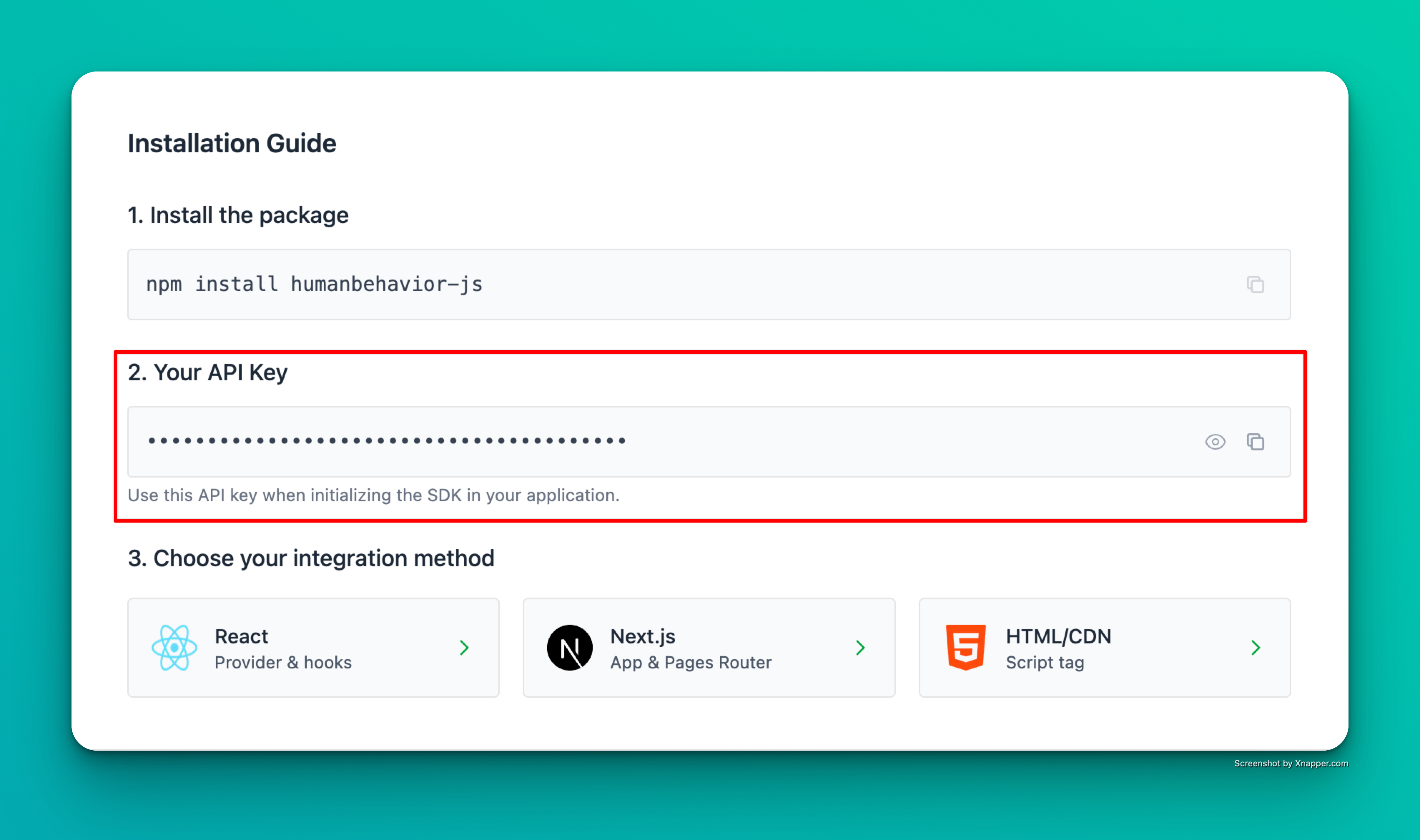
Example screenshot – your actual API key will be different.
Step 1: Installation
npm install humanbehavior-js
# or
yarn add humanbehavior-js
Step 2: Environment Variables
Create an environment file (.env) with your API key:
# For Vite projects
VITE_HUMANBEHAVIOR_API_KEY=your-api-key-here

# For Create React App
REACT_APP_HUMANBEHAVIOR_API_KEY=your-api-key-here
Step 3: Basic Setup
Wrap your app with the provider
Use the React provider for the best integration and automatic tracking:
import { HumanBehaviorProvider } from 'humanbehavior-js/react';

function App() {
  return (
    <HumanBehaviorProvider apiKey={import.meta.env.VITE_HUMANBEHAVIOR_API_KEY}> {/* For Vite */}
    {/* OR */}
    <HumanBehaviorProvider apiKey={process.env.REACT_APP_HUMANBEHAVIOR_API_KEY}> {/* For Create React App */}
      <div>
        <h1>My React App</h1>
        {/* Your app content */}
      </div>
    </HumanBehaviorProvider>
  );
}

export default App;
That’s it! The SDK now automatically tracks user interactions, navigation, and console events. Everything past here is optional.
Usage in Components
Track Custom Events
import { useHumanBehavior } from 'humanbehavior-js/react';

function MyComponent() {
  const tracker = useHumanBehavior();

  const handleClick = () => {
    tracker.customEvent('button_clicked', {
      componentName: 'MyComponent',
      buttonId: 'submit-btn'
    });
  };

  return (
    <button onClick={handleClick}>
      Submit
    </button>
  );
}
Alternative: Manual Initialization
If you prefer manual setup, you can initialize the tracker directly:
import React from 'react';
import { HumanBehaviorTracker } from 'humanbehavior-js';

function App() {
  React.useEffect(() => {
    // Initialize the tracker once globally
    const tracker = HumanBehaviorTracker.init(process.env.REACT_APP_HUMANBEHAVIOR_API_KEY);
  }, []);

  return (
    <div>
      <h1>My React App</h1>
      {/* Your app content */}
    </div>
  );
}

export default App;
Data Redaction
Configure data redaction for sensitive information:
import { HumanBehaviorProvider } from 'humanbehavior-js/react';

function App() {
  return (
    <HumanBehaviorProvider
      apiKey={process.env.REACT_APP_HUMANBEHAVIOR_API_KEY}
      options={{
        redactionStrategy: {
          mode: 'visibility-first' as const
        }
      }}
    >
      <div>
        <h1>My React App</h1>
        {/* Your app content */}
      </div>
    </HumanBehaviorProvider>
  );
}
Runtime Redaction Control
import { useHumanBehavior } from 'humanbehavior-js/react';

function MyComponent() {
  const tracker = useHumanBehavior();

  const handleUnredactField = () => {
    tracker.setUnredactedFields(['#new-public-field']);
  };

  return (
    <button onClick={handleUnredactField}>
      Unredact New Field
    </button>
  );
}
Features
- ✅ Automatic page view tracking
- ✅ React hooks for custom events
- ✅ TypeScript support included
- ✅ Optimized for React 18+
- ✅ Flexible data redaction with privacy-first and visibility-first modes
Troubleshooting
- Check browser console for any error messages
- Verify your API key is correct
- Ensure the tracker is initialized before any user interaction